
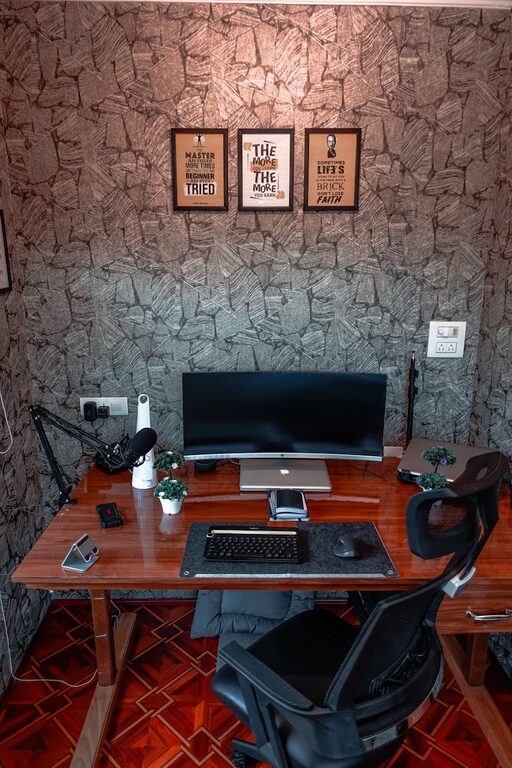
Creating a comfortable and efficient workspace at home can significantly improve your productivity and well-being. Whether you work remotely full-time or occasionally need a spot to focus, combining coziness with functionality is key. This guide offers practical tips to help you design a home workspace where you’ll enjoy spending time and getting tasks done.
Choose the Right Location
Selecting the perfect spot for your home workspace is the first step. Ideally, pick a quiet area with minimal distractions. If possible, use a separate room to create a distinct boundary between work and relaxation. If space is limited, choose a corner or nook with enough room for your desk and chair.
Consider natural lighting while choosing your location. A spot near a window can provide daylight that helps reduce eye strain and boosts mood. If natural light is scarce, make sure to have good quality artificial lighting, including a desk lamp with adjustable brightness.
Invest in Comfortable and Supportive Furniture
Your chair and desk play a big role in making your workspace cozy and functional.
– Ergonomic Chair: Choose a chair with adjustable height, lumbar support, and comfortable padding. Sitting comfortably helps reduce back and neck pain.
– Appropriate Desk: Select a desk that fits your space and work needs. If you use a laptop or multiple monitors, ensure there is enough surface area.
– Desk Height: Make sure the desk height allows your forearms to rest comfortably parallel to the floor when typing.
– Additional Seating: If you like to take breaks or brainstorm, having a small armchair or pouf nearby for relaxation can make the space inviting.
Organize with Practical Storage Solutions
Clutter can quickly make a workspace feel chaotic and stressful. Use storage options that keep your essentials within reach but out of your way.
– Desk Organizers: Pens, papers, and small accessories can be stored neatly in trays or drawers.
– Shelves: Wall-mounted shelves save floor space and hold books, binders, or decorative items.
– Cable Management: Use clips or sleeves to keep cords untangled and out of sight.
– File Storage: Use vertical file holders or cabinets to keep important documents organized.
Personalize Your Workspace
Adding personal touches enhances coziness and motivation.
– Plants: Small potted plants improve air quality and add natural beauty.
– Artwork or Photos: Frames with favorite images or inspiring quotes can lift your mood.
– Textiles: Consider a soft rug, cushions, or a throw blanket for warmth and comfort.
– Colors: Use calming or energizing colors based on your preference—a soft blue or green may promote focus, while pops of yellow or orange can boost creativity.
Optimize Lighting and Screen Positioning
Proper lighting reduces eye strain and makes your workspace pleasant to use.
– Desk Lamp: Invest in a lamp with adjustable brightness and color temperature.
– Screen Position: Position your monitor or laptop screen at eye level and about an arm’s length away to avoid neck strain.
– Glare Reduction: Use blinds or curtains to minimize glare from windows, and adjust screen brightness accordingly.
Incorporate Technology Thoughtfully
Your technology setup should enhance productivity without causing clutter.
– Wireless Devices: Wireless keyboards, mice, and headphones reduce cable mess.
– Charging Station: A dedicated spot for charging phones or tablets helps keep devices powered and organized.
– Noise Control: Use noise-cancelling headphones or white noise machines if you need to block distractions.
– Software Tools: Organize your digital workspace with apps for task management, communication, and focus.
Create a Routine and Boundaries
A comfortable workspace supports your work habits but setting boundaries ensures it functions well.
– Work Hours: Define clear work times and take breaks away from your desk to rest and recharge.
– Workspace Use: Train household members to respect your workspace during working hours.
– End-of-Day Ritual: Declutter your desk and turn off devices to signal the end of your workday.
Add Elements for Relaxation and Inspiration
Including items that help you unwind or spark creativity makes your workspace more enjoyable.
– Inspiring Books or Magazines: Keep reading material nearby for ideas and relaxation.
– Aroma: Use a subtle diffuser or scented candle with calming scents like lavender or citrus.
– Music: Create playlists with music that helps concentration or elevates your mood.
Keep Comfort in Mind
Don’t forget basic comforts that improve your overall experience.
– Temperature Control: Use a fan, heater, or window ventilation to maintain a comfortable temperature.
– Hydration: Keep a water bottle or cup nearby to stay hydrated.
– Snacks: Healthy snacks within reach can keep energy levels up without disrupting workflow.
—
Designing a cozy and functional home workspace takes time and attention to your needs. By combining ergonomic furniture, smart organization, personal touches, and good lighting, you create an environment that supports both comfort and productivity. Remember, your ideal workspace is one where you feel motivated, focused, and at ease. Happy decorating!
